Page 23 - Blog
-
Posted: November 12, 2019Read more »
Bulk cable solutions from ShowMeCables enable technology and establish connections. Every building, wireless system, and communication network across the frequency spectrum requires wired infrastructure. Although, cabling might not be the focus of many tech projects, when cabling isn’t working the entire system grinds to a halt causing downtime and service disruption.
Understanding the thank-less yet critical role infrastructure cable plays, we prioritize performance, reliability, and availability with our bulk cabling solutions. Using carefully curated product offerings from trusted manufacturers and spec-equivalent generic products we give you the options you need to get the job done. ShowMeCables bulk cable offerings are trusted by millions.
Here are four advantages of purchasing bulk cable from ShowMeCables:
- We cut cable. From testing purposes to huge installations, ShowMeCables can cut your order to exactly what you need. This huge benefit to you helps to reduce waste, save money,
-
Posted: October 22, 2019
 Read more »
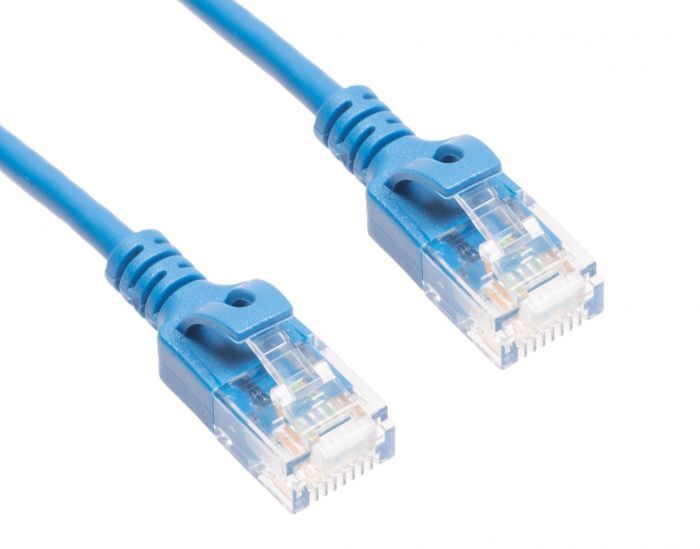
What is a Cat6a Slim Patch Cable?
A Cat6a slim patch cable is an ethernet cable, which is used with wired networks and connect devices like computers, routers and switches with a local network. Patch cables normally travel short distances (a maximum of 100 meter or 330 feet), and can be used to wire offices and server closets. This cable provides a reliable, high-speed data connection to your home or office network, and is good to keep on hand!
What Makes a Slim Cat6a Patch Cable Special?
Here are a few differences between the Cat6a slim patch cable and the Cat6 patch cable.
It is 40% thinner than its predecessor. This allows for more airflow as well as more flexibility within the cable itself. What this means for you is a tighter turn radius and less congestion, and the ability to do more in smaller spaces.
Better blocking of electromagnetic interference (EMI) and radiofrequency interference (RFI) occurs. If you are seeking a cable that needs to be next to other cables or machines that
-
Posted: October 06, 2019Categories: managementRead more »
Wire mesh cable trays have been gaining in popularity over the past decade. It is becoming the preferred cable support choice of installers, integrator and construction companies. Here are a few of the advantages of wire mesh cable tray vs. closed cable tray or conduit.
Material & Cost Savings
Due to the nature of wire mesh having openings, it requires less raw materials to make, which is better for the environment and reduces manufacturing costs. There is both less steel and less steel waste for wire mesh trays than solid steel trays or cable ladder trays. This savings is passed on to the customer. As a whole wire mesh cable tray (also referred to as cable baskets) is less expensive than other solutions.
Solutions for All IndustriesCable trays are used in all types of industries including fiber optic installations in data centers, data cabling in offices, tray cable for manufacturing or harsh environment industries such as oil and gas. Wire mesh cable trays options include
-
Posted: September 18, 2019Categories: HDMIRead more »
“4k” is a term that gets thrown around a lot these days, particularly pertaining to TVs and HDMI cables. Consumers constantly see packaging and marketing saying things like “Supports 4k” or “4k image quality”. If you buy a new TV at a big-box electronics store, employees there may tell you to remember to get a 4k HDMI cable to go with it only to tell you that that cable costs $100. The correct answer to that question is, “No, thank you.” All HDMI cables built to modern standards today support 4k, from cost-effective $3 cables and up. Many general stores will sell them much more expensively simply because most consumers do not know that and will buy them even when they are horrendously overpriced.
This article will cover why a $3 HDMI cable at ShowMeCables is just as good as a $100 one at a big box store by explaining what 4k is and what the legitimate differences are between low-end and high-end HDMI cables.
What is 4k?
Most people know that 4k means a TV, monitor, or other display
-
Read more »
The end of an RJ45 Ethernet connector (left) vs. an RJ12 phone connector (right)
Ethernet and telephone cables look fairly similar and it is not uncommon to get the two mixed up. The key difference between the two is the size of the plastic connectors on the ends of the cable. Telephones use an RJ11/RJ12 connector whereas Ethernet uses RJ45. RJ11/RJ12 only uses 4-6 pins whereas RJ45 uses 8 pins. As a result, RJ11/RJ12 is physically smaller than RJ45 since it does not need to contain as many pins. See the RJ11 to RJ45 wiring diagram for more info.
Key Takeaways
- Ethernet and telephone cables serve different primary purposes.
- Ethernet cables are designed for networking and data transmission.
- Telephone cables are commonly used for voice and telephone-line connections.
- RJ45/8P8C connectors are commonly associated with Ethernet, while RJ11 connectors are commonly associated with telephone equipment.
- Ethernet cable categories include Cat5e, Cat6, Cat6a, Cat7, and Cat8.
- Similar-looking
-
Read more »
MHL stands for Mobile High-Definition Link. It is an industry standard for Android smartphones that can be connected to display devices such as TVs, monitors, and projectors. Devices built with ports that are MHL-ready work a bit differently than the “standard” version of those same ports, enabling extra features and functionality.
How does MHL Work?
Most handheld electronics are built with some sort of USB port. This can be Micro USB 2.0, Micro USB 3.0, or USB-C depending on the device and its age. Most of the time, people use these ports to just recharge their phones/tablets or sometimes to move pictures, videos, and other data between the phone/tablet and a computer. The issue old phones ran into here was that USB ports are designed to transmit data, not audio/video. At the same time, the USB port was the best option for getting photos and videos stored on a phone onto bigger screens.
MHL was the solution developed to circumvent this problem. Created in a joint project by Nokia,
-
Posted: September 09, 2019Categories: HDMIRead more »
On the back of every TV, there are different ports for various types of cables. Each of these is labeled so users know which cables go where. Every TV today is built with HDMI ports as the current audio/video standard. For the most part, these ports are simply labeled “HDMI”. But if you take a closer look, you may notice one labeled as “HDMI ARC”. This is a special type of HDMI port that comes with a few extra features when connecting a soundbar, receiver, or other audio system to a TV.
Key Takeaways
- HDMI ARC means Audio Return Channel.
- ARC allows compatible TVs to send audio back to a soundbar or receiver through HDMI.
- Both connected devices need compatible ARC functionality.
- Always connect the HDMI cable to the ARC-labelled HDMI port.
- ARC can help reduce cable clutter in home entertainment setups.
- Audio capabilities vary depending on the TV, source, sound system, and supported formats.
- eARC is the enhanced version designed for greater bandwidth and more advanced audio capabilities.
-
Posted: September 04, 2019Categories: DisplayPortRead more »
What is DisplayPort?
DisplayPort (left in the image above) is a 20-pin digital video cable developed by the Video Electronics Standards Association (VESA). It is one of the most advanced cables on the market today and was specifically designed for use with computer monitors.
What is Mini DisplayPort?
Mini DisplayPort (right in the image above) is a downsized version of DisplayPort that is used on devices too small to fit a standard DisplayPort.
What is Thunderbolt?
Thunderbolt is an off-shoot of Mini DisplayPort developed by Intel & Apple most commonly seen on Apple products. While Thunderbolt and Mini DisplayPort look the same, Thunderbolt is much more advanced. Mini DisplayPort is not forward compatible with Thunderbolt, but Thunderbolt is backward compatible with Mini Displayport.
What is DisplayPort 1.2?
DisplayPort 1.2 is the current standard version manufactured by most cable makers. DisplayPort was originally released in 2006 (version 1.0) but has had several improvements since
-
Posted: September 02, 2019Categories: DisplayPortRead more »
DisplayPort is the latest and greatest audio/video cable available today. While it does have many similarities with HDMI, DisplayPort is even more powerful. Whereas HDMI was designed as a multi-purpose cable capable of working with any and all electronics, DisplayPort was specifically created with computer monitors in mind. Capable of supporting HD video at even higher resolutions than HDMI, there is no better choice than DisplayPort when cable quality is your primary concern.
DisplayPort Specifications
The original DisplayPort cable, version 1.0, was developed by VESA (Video Electronics Standards Association) and introduced in May 2006. Since then, several newer versions with various improvements have been developed and replaced their older counterparts. Many DisplayPort cables on the market are not marked with a version number, so knowing the age of the cable is the best way to tell how well it performs. These days, users would be unlikely to come across a cable older than version 1.2.
-
Posted: August 28, 2019Categories: EthernetRead more »
What is Ethernet?
Ethernet is a network cable used to connect computers, printers, modems, routers, and other electronics to the Internet. Other names for Ethernet include Cat5e cable, Cat6 cable, Cat7 cable, and RJ45 cable.
What does Ethernet Look Like?
Ethernet looks similar to a telephone cord, but with a larger plastic connector on the end. Inside the connector are 8 wires, each a different color to tell them apart easily.
How does Ethernet Work?
Electrical signals are sent down the wires inside the Ethernet cable. If the electricity is on, it translates to “1”. If it is off, it translates to “0”. These 1’s and 0’s are read by computers and other machines as binary code.
How Long can an Ethernet Cable be?
The maximum length of a single Ethernet cable is 328 feet (100 meters).
How do you Connect Ethernet Cables?
Simply plug the Ethernet cable into an Ethernet port and it will be ready to go. All Ethernet cables are made with locking tabs that keep them in