Ethernet
-
Posted: February 18, 2026Categories: EthernetRead more »
Wall-mount racks have become increasingly popular in various environments, including commercial offices, retail spaces, and compact IT rooms, primarily due to their ability to save valuable floor space. However, while these smaller enclosures offer a practical solution for storage and organization, they also introduce a significant challenge: cable congestion. Standard straight Ethernet patch cables can protrude awkwardly from the back of the rack, leading to sharp bends and an overall messy appearance. This not only detracts from the aesthetics of the installation but can also impede airflow and create unnecessary strain on the cables, potentially reducing their lifespan and affecting network performance.
-
Posted: November 23, 2025Read more »
Small and medium-sized businesses (SMBs) are increasingly recognizing the importance of robust and scalable network infrastructure to stay competitive. As digital transformation accelerates, the demand for high-speed internet connectivity, seamless data transfer and reliable communication channels has never been greater. Ethernet and fiber cabling solutions, particularly Cat6a and Cat7, along with fiber optic technology, play a pivotal role in future-proofing SMB networks.
-
Posted: November 13, 2025Modern businesses rely on robust and scalable networks. Yet, many SMBs, retail chains and offices still use “ad hoc” wiring—patching cables wherever convenient without planning. While quick, this approach often results in maintenance of headaches, downtime and limited future growth.Read more »
-
Posted: October 15, 2025Categories: EthernetRead more »
As enterprises scale their networks, outdated cabling can quickly become a hidden bottleneck holding back performance, security and long-term reliability. Upgrading to modern enterprise Ethernet cables is a critical step for organizations planning sustained growth in corporate offices and multi-site environments. The right cable choice can make the difference between seamless, future-ready connectivity and costly rework in only a few years.
-
Posted: July 23, 2025Read more »
As millions of aging baby boomers enter their senior years—driving up demand for healthcare—networks must support increasingly complex and data-heavy systems (medsien.com). At the same time, rising cybersecurity threats have made fast, reliable connectivity a critical necessity (processbolt.com).
To keep up with growing demands, healthcare organizations must invest in high-speed, scalable IT infrastructure that ensures seamless performance across all operations—from patient intake to back-office systems. This post explores the key components of a reliable healthcare network and the risks of falling behind in keeping such a network in step with the times. We also provide practical solutions like upgraded cabling, PoE technology and surge protection that help future-proof healthcare environments.
Network Performance Directly Impacts Patient Experience
From telehealth consultations to electronic health record access, older patients now expect quick, responsive systems that support
-
Posted: November 17, 2024Categories: EthernetRead more »
Voice and data networks rely on a variety of connectors to ensure seamless communication, whether through voice calls, internet access, or data sharing – foremost among these are RJ45 Ethernet connectors and fiber optic connectors. They are essential for interfacing different network devices, enabling fast data transmission, and supporting scalable infrastructure. This blog post explores RJ45 Ethernet connectors and fiber optic connectors . We cover their main features and uses, and why you might choose one type over the other.
RJ45 Ethernet Connectors
The RJ45 connector is a staple in Ethernet-based networks, found in homes, offices, and data centers worldwide. It is used for connecting computers, routers, switches, and other devices to a local area network (LAN) via Category 5e (Cat 5e), Category 6 (Cat 6), or higher-grade Ethernet cables.
Some Features:
- 8-pin modular design: Each RJ45 plug houses eight pins, corresponding to eight individual wires within the Ethernet cable, arranged
-
Posted: October 16, 2024Read more »
When shopping for Ethernet and fiber optic outdoor and industrial connectors, the selection process can be overwhelming due to the variety of features and types available. Understanding the different elements that contribute to performance, durability, and suitability for your specific application ensures you invest wisely in reliable outdoor and industrial connectors. Here, we’ll explore the key features to consider, along with the benefits of these features.
Outdoor vs. Industrial
While both outdoor connectors and industrial connectors are designed to withstand challenging environments, they serve different purposes. Outdoor connectors are made to endure exposure to elements such as moisture, UV light, and temperature fluctuations. They often feature rigorous weatherproofing and ingress protection ratings (such as IP67 or IP68), making them ideal for applications located outside of buildings, like security cameras, outdoor access points, and remote monitoring systems. In contrast, industrial
-
Posted: November 18, 2019
 Read more »
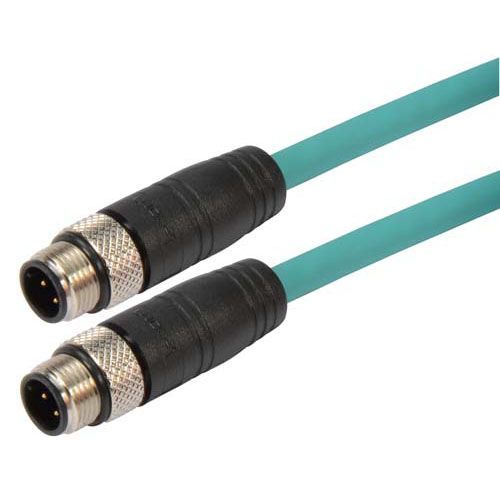
Networking takes shape in many different environments and not just in clean, dry server rooms. Many industries, including automation, robotics, and alternative energy must have access to networks but are out in the field quite often. The products used to build these networks must withstand harsh environmental factors for the long haul. Our new M12 cables manufactured by L-com provide secure connections for all of your industrial networking application needs.
What is an M12 cable?
M12 cables from ShowMeCables are category-rated ethernet cables with two connectors on either end. These circular connectors have 12mm locking threads to ensure an established connection and a tight seal. Specifically, the twelve pins within the cable meet industrial signal requirements and keep you connected to a secure network.
What makes an M12 cable special?
The difference between traditional category-rated ethernet cables and M12 ethernet cables is the environment in which they can perform. Traditional ethernet
-
Posted: October 22, 2019
 Read more »
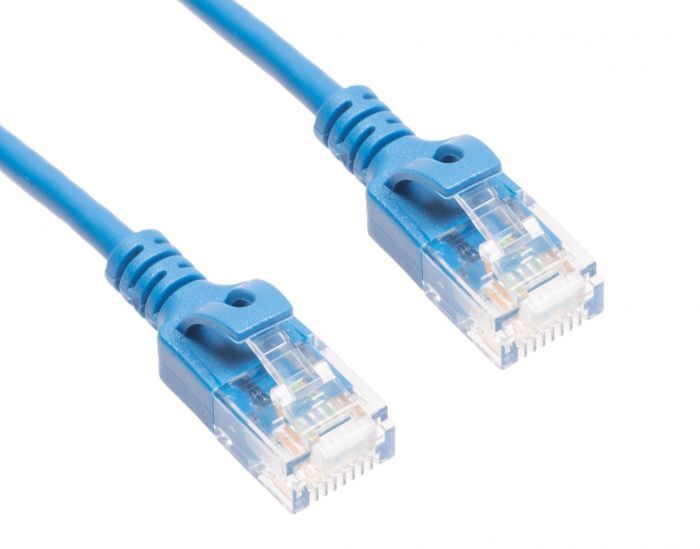
What is a Cat6a Slim Patch Cable?
A Cat6a slim patch cable is an ethernet cable, which is used with wired networks and connect devices like computers, routers and switches with a local network. Patch cables normally travel short distances (a maximum of 100 meter or 330 feet), and can be used to wire offices and server closets. This cable provides a reliable, high-speed data connection to your home or office network, and is good to keep on hand!
What Makes a Slim Cat6a Patch Cable Special?
Here are a few differences between the Cat6a slim patch cable and the Cat6 patch cable.
It is 40% thinner than its predecessor. This allows for more airflow as well as more flexibility within the cable itself. What this means for you is a tighter turn radius and less congestion, and the ability to do more in smaller spaces.
Better blocking of electromagnetic interference (EMI) and radiofrequency interference (RFI) occurs. If you are seeking a cable that needs to be next to other cables or machines that
-
Read more »
The end of an RJ45 Ethernet connector (left) vs. an RJ12 phone connector (right)
Ethernet and telephone cables look fairly similar and it is not uncommon to get the two mixed up. The key difference between the two is the size of the plastic connectors on the ends of the cable. Telephones use an RJ11/RJ12 connector whereas Ethernet uses RJ45. RJ11/RJ12 only uses 4-6 pins whereas RJ45 uses 8 pins. As a result, RJ11/RJ12 is physically smaller than RJ45 since it does not need to contain as many pins. See the RJ11 to RJ45 wiring diagram for more info.
Key Takeaways
- Ethernet and telephone cables serve different primary purposes.
- Ethernet cables are designed for networking and data transmission.
- Telephone cables are commonly used for voice and telephone-line connections.
- RJ45/8P8C connectors are commonly associated with Ethernet, while RJ11 connectors are commonly associated with telephone equipment.
- Ethernet cable categories include Cat5e, Cat6, Cat6a, Cat7, and Cat8.
- Similar-looking