
HDMI vs. DisplayPort vs. DVI vs. VGA: What’s the Difference?


There are a variety of different cables that can be used for video connections. While there have been industry efforts at streamlining, even today there are multiple options on the market. Each type of video cable is easily identified by its unique size and shape, but there are also differences when it comes to the quality of each cable signal. Knowing these differences can enable users to make educated choices when selecting cables for electronic devices.
|
|
Current Version |
Analog/Digital |
Max Resolution |
Locking Connector |
Bandwidth |
|
HDMI |
2.0 |
Digital |
4k (3840 x 2160) |
18.0 Gbit/s |
|
|
DisplayPort |
1.2 |
Digital |
4k (3840 x 2160) |
No |
21.6 Gbit/s |
|
DVI-D single-link |
Single-link |
Digital |
1920 x 1080 |
Yes |
4.95 Gbps |
|
DVI-D dual-link |
Dual-link |
Digital |
2040 x 1536 |
Yes |
9.9 Gbps |
|
DVI-I single-link |
Single-link |
Analog/Digital |
1600 x 1200 |
Yes |
4.95 Gbps |
|
DVI-I dual-link |
Dual-link |
Analog/Digital |
1920 x 1080 |
Yes |
9.9 Gbps |
|
DVI-A |
N/A |
Analog |
1920 x 1080 |
Yes |
85 Hz |
|
VGA |
N/A |
Analog |
1920 x 1080 |
Yes |
85 Hz |
Key Takeaways
- HDMI, DisplayPort, DVI, and VGA are different display interfaces with different capabilities and use cases.
- HDMI and DisplayPort are modern digital interfaces commonly used with computers, monitors, TVs, and other audiovisual equipment.
- DVI is an older interface that can support digital and/or analogue video depending on the DVI type.
- VGA is an older analogue video interface still found on some legacy equipment.
- HDMI is widely used for TVs and home theatres because it can carry audio and video through one cable.
- DisplayPort is widely used for PC monitors and can be well suited to high-resolution and high-refresh-rate applications when supported.
- DVI can be useful for connecting legacy computers and displays.
- VGA is mainly relevant to older monitors, projectors, and computers.
- Always check the source port and display port before selecting a cable.
- Resolution and refresh rate are important when choosing a cable for modern displays.
- For long-distance video installations, consider signal distance, cable construction, and active solutions or extenders where appropriate.
- When converting between different interfaces, determine whether an active converter is required.
- The best video cable is the one that supports the equipment, resolution, refresh rate, audio requirements, and installation distance.
HDMI
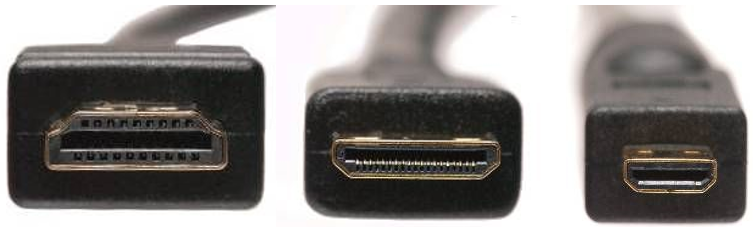
From left to right: Standard HDMI, Mini HDMI, and Micro HDMI
HDMI (High-Definition Multimedia Interface) was developed as a joint project by various technology and multimedia companies who wanted to streamline audio/video connections. The goal was to create a single cable as a universal industry standard that could be supported across all devices regardless of brand. In late 2002 they succeeded and HDMI 1.0 was released. Newer versions of HDMI have been released since then, with the latest 2.1 version coming out in late 2017.
Today, HDMI cables are used on almost every electronic including TVs, computers, Blu-ray players, projectors, and more. Aside from near-universal compatibility, the main draw of HDMI is its 4k video resolution. The first version of HDMI capable of fully supporting 4k was version 2.0, released in September 2013. It should be noted that the previous version, 1.4b, did have some 4k capability but did not support it fully.
There are also two downsized versions, Mini HDMI and Micro HDMI. These are used on electronics that are too small to accommodate a standard HDMI port like tablets and cell phones.
If an electronic has a port for HDMI, it is the best all-around cable users can go with today.
DisplayPort
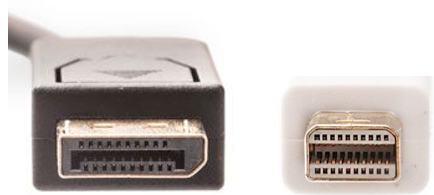
Standard DisplayPort (left) and Mini DisplayPort (right)
DisplayPort was designed specifically for use with computer monitors. It is a very powerful cable, even more so than HDMI, capable of supporting the highest video resolution (8k) currently available. Many monitors today are built with DisplayPort as well as HDMI, but high-end monitors may only have DisplayPort due to its superior video quality.
There is also a downsized version called Mini DisplayPort, used on electronics too small to house the standard version. The Mini version was originally implemented by Apple and is most commonly seen on MacBooks, although some Windows computers use Mini DisplayPort as well.
Apple also makes an upgraded version of Mini DisplayPort called Thunderbolt. While it is backward-compatible with the older Mini DisplayPort, Apple does not share the proprietary rights of the Thunderbolt so it will not be seen on non-Apple devices. A Mini DisplayPort cable will not work with a newer Thunderbolt port. To tell Mini DisplayPort and Thunderbolt apart, look for a small lightning bolt symbol. If it is present, a cable or port is Thunderbolt. If not, it is a Mini DisplayPort.
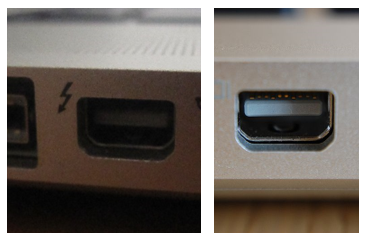
A Thunderbolt connection (left) vs. a Mini DisplayPort connection (right)
Like HDMI, DisplayPort is audio/video ready. When using a computer monitor, DisplayPort is the best option available to use.
DVI
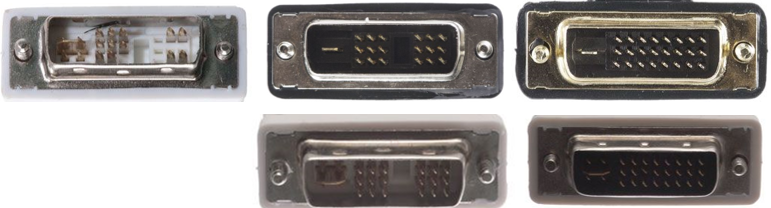
Top row: DVI-A, DVI-D single-link, and DVI-D dual-link
Bottom row: DVI-I single-link and DVI-I dual-link
DVI cables are an older type of video connection. While it is not obsolete just yet, it is on its way there. Like DisplayPort, DVI only supports video and not audio. DVI is also bulkier, does not support 4k like HDMI or DisplayPort, and is a bit more complicated as there are different versions of it.
There are two sub-categories for DVI, the first of which contains single-link and dual-link. Simply put, dual-link uses more pins in the connector which allows for greater video resolution.
The other category relates to DVI’s ability to be digital and/or analog. DVI-I (integrated) is capable of supporting both analog and digital signals. DVI-D (digital) can be adapted to newer digital formats but will be limited to DVI’s maximum resolution. DVI-A (analog) is typically only used to adapt to VGA, an even older video format. Generally, users should only use DVI when HDMI and DisplayPort are unavailable.
VGA
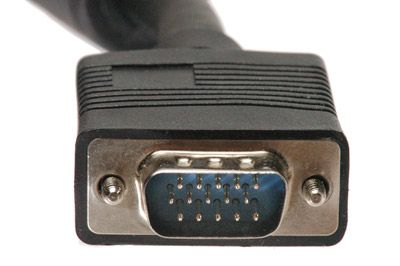
VGA is an outdated analog video connection no longer used as a standard for most electronics, although they are still heavily used on projectors. For other electronics like computers and monitors, plenty of units equipped with VGA cables are still functional but few are still manufactured. Typically, the only reason to use VGA today is if it is the only option available.
Tips for Choosing HDMI, DisplayPort, DVI, or VGA
- Before buying a cable, inspect the video output on the computer, graphics card, laptop, or source device and the input on the monitor, TV, or projector.
- Check the resolution your display requires. For example, a basic office monitor may have different requirements from a high-resolution gaming monitor or professional display. Choose an interface and cable appropriate for the resolution and refresh rate you need.
- If you're using a gaming or high-refresh-rate monitor, verify that the selected connection can support the required resolution and refresh rate. Don't select a cable based solely on the connector shape.If you're using a gaming or high-refresh-rate monitor, verify that the selected connection can support the required resolution and refresh rate. Don't select a cable based solely on the connector shape.
- HDMI is widely used for televisions, monitors, game consoles, streaming devices, Blu-ray players, and home theatre equipment. It can carry digital video and audio through a single cable.
- DisplayPort is commonly used for computers, graphics cards, and monitors. It can be particularly useful for PC setups requiring high resolutions, high refresh rates, or multi-monitor configurations, depending on the equipment and DisplayPort version.
FAQs – Frequently asked questions
What is the difference between HDMI and DisplayPort?
Both are digital display interfaces capable of carrying video and, when supported, audio. Their capabilities and connector designs differ, so the appropriate choice depends on the source device, display, resolution, refresh rate, and required features.
Is HDMI better than DisplayPort?
Neither is universally better. HDMI is especially common in TVs and consumer electronics, while DisplayPort is widely used for PC monitors and graphics cards. Choose the interface supported by your equipment and required display specifications.
What is the difference between HDMI and DVI?
HDMI is a modern digital interface that can carry both video and audio. DVI is an older interface with different variants, including digital-only and digital/analogue versions.
What is the difference between HDMI and VGA?
HDMI is a digital interface, while VGA is an analogue video interface. HDMI can also carry audio when supported, whereas VGA is primarily a video connection.
Get Your Video Cables Today
ShowMeCables is a leading provider of video cables whether it is HDMI, DisplayPort, DVI, VGA, or something else entirely. We also carry an array of adapters for changing existing video cables to other formats. Our inventory also includes converters for translating signals between analog and digital formats. Whether an old cable is being salvaged or replaced entirely, ShowMeCables is ready to help today.
Each and every product at ShowMeCables is tested to federally regulated standards to ensure quality and backed up by warranty. Have questions? You can reach our Sales team at 888-519-9505 or Sales@ShowMeCables.com