ethernet
-
Posted: October 22, 2019
 Read more »
What is a Cat6a Slim Patch Cable?
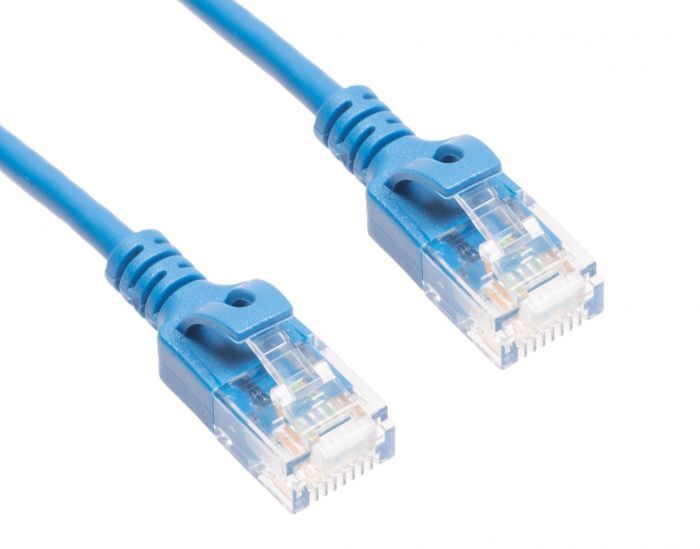
A Cat6a slim patch cable is an ethernet cable, which is used with wired networks and connect devices like computers, routers and switches with a local network. Patch cables normally travel short distances (a maximum of 100 meter or 330 feet), and can be used to wire offices and server closets. This cable provides a reliable, high-speed data connection to your home or office network, and is good to keep on hand!
What Makes a Slim Cat6a Patch Cable Special?
Here are a few differences between the Cat6a slim patch cable and the Cat6 patch cable.
It is 40% thinner than its predecessor. This allows for more airflow as well as more flexibility within the cable itself. What this means for you is a tighter turn radius and less congestion, and the ability to do more in smaller spaces.
Better blocking of electromagnetic interference (EMI) and radiofrequency interference (RFI) occurs. If you are seeking a cable that needs to be next to other cables or machines that
-
Read more »
The end of an RJ45 Ethernet connector (left) vs. an RJ12 phone connector (right)
Ethernet and telephone cables look fairly similar and it is not uncommon to get the two mixed up. The key difference between the two is the size of the plastic connectors on the ends of the cable. Telephones use an RJ11/RJ12 connector whereas Ethernet uses RJ45. RJ11/RJ12 only uses 4-6 pins whereas RJ45 uses 8 pins. As a result, RJ11/RJ12 is physically smaller than RJ45 since it does not need to contain as many pins. See the RJ11 to RJ45 wiring diagram for more info.
Modular Connectors
Both Ethernet and telephone cables are made using modular connectors. These are connectors that were designed to be used with registered jack (RJ) twisted-pair cables. The original modular jacks were invented by AT&T in the 1960s and used for some telephones. Over time they caught on and eventually became industry-standard in the 1970s.
Each type of modular connector has an RJ designation, but can also be referred
-
Posted: August 28, 2019Categories: EthernetRead more »
What is Ethernet?
Ethernet is a network cable used to connect computers, printers, modems, routers, and other electronics to the Internet. Other names for Ethernet include Cat5e cable, Cat6 cable, Cat7 cable, and RJ45 cable.
What does Ethernet Look Like?
Ethernet looks similar to a telephone cord, but with a larger plastic connector on the end. Inside the connector are 8 wires, each a different color to tell them apart easily.
How does Ethernet Work?
Electrical signals are sent down the wires inside the Ethernet cable. If the electricity is on, it translates to “1”. If it is off, it translates to “0”. These 1’s and 0’s are read by computers and other machines as binary code.
How Long can an Ethernet Cable be?
The maximum length of a single Ethernet cable is 328 feet (100 meters).
How do you Connect Ethernet Cables?
Simply plug the Ethernet cable into an Ethernet port and it will be ready to go. All Ethernet cables are made with locking tabs that keep them in
-
Posted: August 26, 2019Categories: EthernetRead more »
Almost every electronic today from simple cell phones to a new 70” TV is made Wi-Fi ready. When setting up a new device, most people will pull up the Wi-Fi menu, connect to their network, and go. While this is usually the obvious choice, it is not always the best one. With most handheld devices it is the only choice, so there is no choice there. But where bigger electronics are concerned, using an Ethernet hardline can provide many advantages over Wi-Fi.
What Makes Wi-Fi Signals Weaker?
Wi-Fi is a popular technology for one key reason: convenience. Being able to connect any device to the Internet while in range of a Wi-Fi signal is a huge deal. Over the last few decades, wireless technology has gone from nothing but pagers to every electronic coming with wireless functionality. Not being limited by the accessibility and distance of a cable was a major game-changer for a multitude of technologies, but that does not mean Wi-Fi’s potential is limitless.
All Wi-Fi signals have to be
-
Posted: August 07, 2019Categories: EthernetRead more »
Not being able to find a Wi-Fi connection is enough to annoy anyone these days. But worse than that, having a slow Wi-Fi connection is sure to raise anybody’s blood pressure. Even in the age of wireless technology, cables and wires are an essential part of making any machine work right. When a smartphone, computer, or any other device is connected wirelessly, the modem/router that wireless signal comes from is still using Ethernet cables. These cables may be providing the Internet signal indirectly, but they are still an integral part of the process.
There are different categories out there and the type used will determine how fast electronics can operate online. If a page is loading slow, a better quality Ethernet cable can potentially make those connections go faster. It also helps to know how much data the average online task uses. Something simple like downloading a picture should go fast on any Ethernet cable whereas more data-heavy tasks like streaming videos can put strain on weaker
-
Posted: July 31, 2019Categories: EthernetRead more »
Ethernet cable has a major role anytime and anywhere the Internet is involved. Whether Internet connections are used at home or in a professional setting like an office, school, hospital, or manufacturing plant, Ethernet plays a part. Even wireless connections have to get their signals from devices like routers or wireless access points that are using Ethernet themselves. But most people who use the Internet for activities with high data usage, like video streaming, will choose Ethernet for its faster speed over Wi-Fi.
Getting hardline connections ready may sound easy, but there is a bit of a planning process that goes into it. Firstly, think about what type of Ethernet cables you will need. Ethernet is divided into different categories. The current default cable is Cat5e, although newer and faster versions are also available. Consider what kind of data speeds the cable should be expected to handle and make a decision from there. Also, ask yourself where the cable will be located. If
-
Posted: July 29, 2019Categories: FAQRead more »
Cables are a specialized market where it can be difficult for new or unfamiliar users to separate fact from fiction. Between urban legends on the Internet and all the different options out there, there is misinformation that many people think is true.To clear up these misconceptions and ensure users can make educated purchases, this article will address a few of the fictions that people commonly mistake for facts in regard to which type of computer cables one can purchase for different uses.
Only Expensive HDMI Cables are 4k – False
Once upon a time, this was true. HDMI has changed over the years as the technology has been upgraded. HDMI cables supporting 4k video became standard back in late 2013. Any HDMI cable on the market today should be more than capable of handling 4k video. If you need a cable with a stronger jacket, then there are better options than a basic cable. But as far as getting a 4k signal goes, a basic HDMI cable will run just as well as an elite one.
Different
-
Read more »
Any modern business is going to be networked with Internet connections. Whether a business is in a small home office with a single computer and printer or an enormous building with hundreds of machines, a nervous system of cables and wiring will be essential to keep things running smoothly. When cables go missing or start to fail, losses in both productivity and profitability are sure to follow. Most homes have a drawer filled with spare cables and there is no reason that an office should not do the same thing, albeit with better organization than a junk drawer.
Ethernet
Every electronic device connected to the Internet uses Ethernet. Even if a device uses WiFi, the equipment generating that WiFi signal is connected via Ethernet. There are different types of Ethernet cable on the market. Newer types (called categories) of Ethernet are faster than older versions, but some are so fast that they can be overkill. Exactly how fast an Ethernet cable should be will depend on how much
-
Posted: July 15, 2019Read more »
Power over Ethernet (abbreviated PoE) is a term that gets thrown around a lot. Most Ethernet cables today are made PoE ready, but what exactly does that mean? What can PoE be used for and how is it different from other options used to accomplish those same tasks? This article will examine what PoE is, its uses, and how well it holds up compared to other modern-day technology.
What is Power over Ethernet (PoE)?
To understand PoE, start by thinking about how Ethernet cables work. At the core of every Ethernet cable, there is are lines of copper that run down the length of the entire cable. Ethernet cables transmit electrical signals that are interpreted by computers and other electronics as the 1’s and 0’s that make up binary code. The takeaway here is that Ethernet cables have always been capable of transmitting electricity since their invention. PoE just takes that function and moves it in a similar but slightly different direction.
PoE was first developed by the company Cisco. Up until
-
Posted: July 08, 2019Read more »
Media converter is a bit of a catch-all term by itself. It refers to any device that can convert one type of signal into another type. A fiber media converter specifically refers to a media converter used to convert fiber cable to another format. Fiber media converters are sometimes just called fiber converters while general media converters are simply called converters. The phrase “fiber converters” is also typically used to describe fiber to copper (Ethernet) converters. Although other types of fiber converters do exist, they are much less common.
What are Fiber Media Converters?
Simply put, a fiber media converter is able to take fiber signals and translate them into Ethernet signals, or vice versa. Fiber transmissions are broadcast using light (lasers) signals, giving them a leg up over older cables with increased speed, less attenuation (signal loss), and greater maximum distance per cable. Ethernet signals are transmitted via electrical signals running through copper lines. On their