
What is an HDMI MHL Cable?


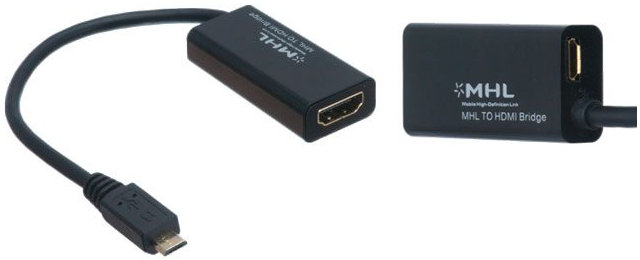
MHL stands for Mobile High-Definition Link. It is an industry standard for Android smartphones that can be connected to display devices such as TVs, monitors, and projectors. Devices built with ports that are MHL-ready work a bit differently than the “standard” version of those same ports, enabling extra features and functionality.
Key Takeaways
- MHL stands for Mobile High-Definition Link.
- MHL was developed to connect compatible mobile devices to external displays.
- An HDMI MHL cable can be used for compatible smartphone-to-TV or display connections.
- MHL and HDMI are not the same technology.
- MHL supports digital audio and video on compatible devices.
- Certain MHL configurations can provide power to the connected mobile device.
- Not every smartphone supports MHL.
- A compatible-looking connector does not guarantee MHL compatibility.
- USB-C does not automatically mean that a device supports MHL.
- Always check the mobile device, display, cable, and adapter specifications before purchasing.
- MHL is less common on newer smartphones, so modern devices may require a different display-output solution.
- The most important step when selecting an MHL cable is confirming compatibility with the specific mobile device and display.
How does MHL Work?
Most handheld electronics are built with some sort of USB port. This can be Micro USB 2.0, Micro USB 3.0, or USB-C depending on the device and its age. Most of the time, people use these ports to just recharge their phones/tablets or sometimes to move pictures, videos, and other data between the phone/tablet and a computer. The issue old phones ran into here was that USB ports are designed to transmit data, not audio/video. At the same time, the USB port was the best option for getting photos and videos stored on a phone onto bigger screens.
MHL was the solution developed to circumvent this problem. Created in a joint project by Nokia, Samsung, Sony, Toshiba, and Silicon Image, MHL was first introduced on the Samsung Galaxy S II in 2011. This variant of USB cable was designed to work with video signals, namely HDMI, without needing a separate adapter.
Is My Phone MHL Compatible?
MHL’s official website has a list of every manufactured device officially rated as MHL compatible. This includes mobile devices (smartphones/tablets), televisions & monitors, home theater systems, vehicles, and a few miscellaneous devices that have been manufactured over the years (namely MHL adapters). Even if your device is not on the official list, it may still have been made to MHL standards. Check the device’s specs to confirm whether or not it is MHL-ready.
Another factor here is that MHL is only available for Micro USB 2.0 (usually just called Micro USB) devices. There are two different versions of Micro USB, one with 5-pins and the other with 11-pins inside the connector. The 11-pin version is older and uses the extra pins for the power (electricity) it needs to function. The newer 5-pin version does not have this requirement. If you have the 5-pin version and need to convert it to 11-pin for compatibility with an older device, there is an adapter for that.
Many manufacturers have opted to cut MHL compatibility in favor of wireless connections on newer phones. USB-C, which has begun replacing Micro USB 2.0, can also support video connections by default and does not need an MHL equivalent. Note that while USB-C can do this, it is not guaranteed to. Check the device specs to see whether the USB-C port supports video. But for users with older phones or who own a TV, monitor, or projector that does not have wireless capabilities, neither of these facts do much good.
How do I use an MHL Adapter?
After determining that a device is MHL compatible, it can be connected to a television using an MHL adapter. Start by plugging the USB end into your smartphone/tablet. This converts the USB port on the phone into an HDMI port. Simply plug one end of an HDMI cable into the other side of the MHL adapter and the other end of the HDMI cable into the TV/monitor/projector. MHL adapters also support recharging, so a handheld device running out of battery life while using the adapter will not be a problem (note: this does require a secondary auxiliary cable).
ShowMeCables offers the MHL adapter as well as any HDMI cables users may need to go with it. Have questions about the MHL adapter or any of our other products? Have questions such as what does HDMI ARC mean? You can reach our Sales team at 1-888-519-505 or Sales@ShowMeCables.com
Tips for Choosing an HDMI MHL Cable
1. Check Whether Your Smartphone Supports MHL
Before purchasing an MHL cable or adapter, verify that the smartphone or mobile device supports MHL. Not every phone with a compatible-looking connector supports MHL functionality.
2. Check the TV or Display Input
Confirm that the television, monitor, or other display has the required HDMI connection and supports the MHL configuration being used.
3. Identify the Mobile Device Connector
Determine whether the mobile device uses a compatible connector, such as Micro-USB, depending on the specific MHL implementation. Connector compatibility alone does not guarantee MHL support.
4. Check MHL Compatibility
MHL is a specific mobile-to-display technology. Check the specifications of both the mobile device and display or adapter rather than assuming that any HDMI cable can provide MHL functionality.
5. Understand the Difference Between HDMI and MHL
HDMI is a digital audio/video interface, while MHL (Mobile High-Definition Link) was developed to enable compatible mobile devices to send audio and video to displays while supporting additional functions such as charging in supported configurations.
6. Check Power Requirements
Some MHL setups require external power depending on the device, adapter, and implementation. Check the cable or adapter specifications before installation.
7. Choose the Correct Adapter
If the phone and display use different interfaces, you may need an MHL adapter or appropriate cable assembly. Make sure the adapter is designed for the specific mobile device and display configuration.
8. Check Cable Length
Choose a cable length that provides enough reach without excessive slack. For mobile-to-TV connections, shorter cable runs can also make the installation easier to manage.
FAQs – Frequently asked questions
What is an HDMI MHL cable?
An HDMI MHL cable is designed to connect a compatible mobile device to an HDMI-equipped display using Mobile High-Definition Link (MHL) technology.
What does MHL stand for?
MHL stands for Mobile High-Definition Link.
What is MHL used for?
MHL was developed to allow compatible mobile devices to transmit digital audio and video to compatible displays. Certain MHL configurations can also provide power to the connected mobile device.