
What Does HDMI ARC Mean?


On the back of every TV, there are different ports for various types of cables. Each of these is labeled so users know which cables go where. Every TV today is built with HDMI ports as the current audio/video standard. For the most part, these ports are simply labeled “HDMI”. But if you take a closer look, you may notice one labeled as “HDMI ARC”. This is a special type of HDMI port that comes with a few extra features when connecting a soundbar, receiver, or other audio system to a TV.
Key Takeaways
- HDMI ARC means Audio Return Channel.
- ARC allows compatible TVs to send audio back to a soundbar or receiver through HDMI.
- Both connected devices need compatible ARC functionality.
- Always connect the HDMI cable to the ARC-labelled HDMI port.
- ARC can help reduce cable clutter in home entertainment setups.
- Audio capabilities vary depending on the TV, source, sound system, and supported formats.
- eARC is the enhanced version designed for greater bandwidth and more advanced audio capabilities.
- Always check the specifications of your TV and audio equipment when troubleshooting HDMI ARC.
What is HDMI ARC?
ARC stands for “Audio Return Channel”. While this is not a new technology (it was introduced in 2009), many consumers are unaware it is an option even if they have all the cables and electronics needed to use it. Utilizing HDMI ARC allows users to only use an HDMI cable for their audio connection instead of an HDMI cable plus a separate audio cable.
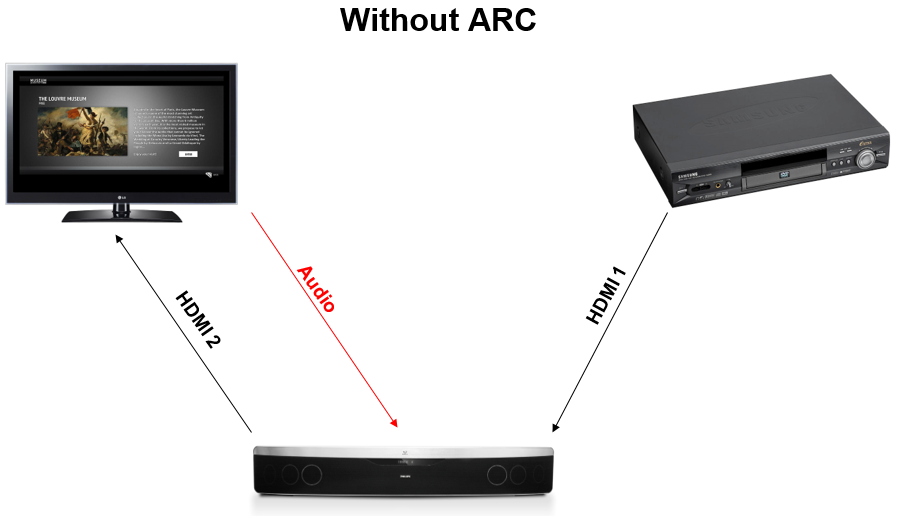
Without ARC, an HDMI cable would need to go from the source (a DVD player, video game console, etc.) to a sound system (soundbar, receiver, etc.) and then from the sound system to the TV. But this signal is one-way and stops at the TV, only passing through the sound system, so a second audio cable must be run from the TV back to the sound system. This makes the sound system the endpoint and enables it to play the audio from the movie, game, show, etc. being played.
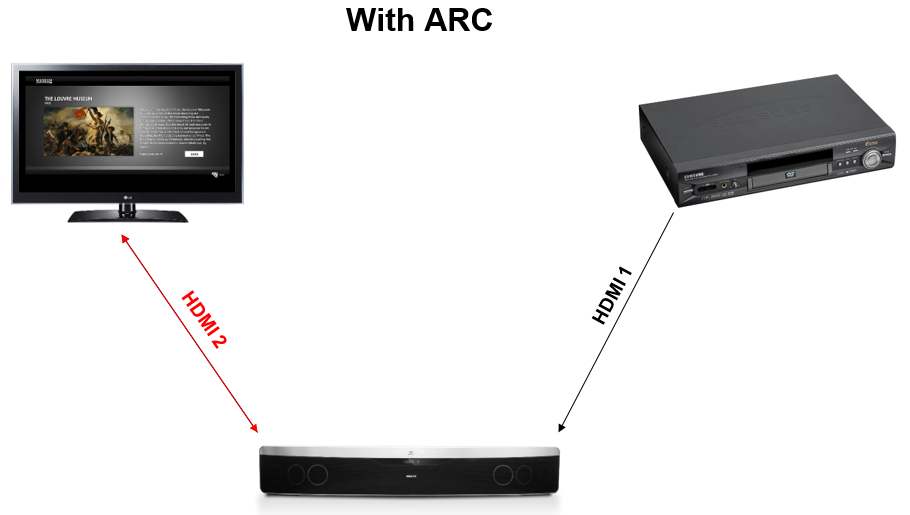
When HDMI ARC is used, the HDMI cable going between the sound system and TV becomes two-way. This allows the entire HDMI signal to go from the sound system to the TV and then just the audio goes back to the sound system. In a nutshell, this means that users do not have to connect a separate audio cable and can have just an HDMI cable running between the TV and sound system, reducing clutter and making cables easier to manage.
Can My TV Use HDMI ARC?
Probably. ARC was developed in 2009 so the majority of modern TVs are equipped with it. HDMI cables that are version 1.4 or newer can support ARC. The current standard for HDMI is version 2.0, which came out in 2013. If you have an HDMI cable that is 6 years old or older, the version number should be written somewhere on the outside of the cable. Just make sure to plug the cable into the port labeled “HDMI ARC” and not one of the other, standard HDMI ports on the back of the TV or sound system.
If your TV or sound system does not have a port labeled “HDMI ARC”, it was unfortunately not made ARC compatible. Both the TV and sound system must have and use an HDMI ARC port for ARC to work correctly. You cannot use an HDMI ARC port on one end and a regular HDMI port on the other end.
Is HDMI ARC as Good as a Dedicated Audio Cable?
Yes and no. It depends on the manufacturer of the TV. Many televisions are not made to send 5.1 surround sound over an HDMI cable. So users accustomed to 5.1 audio may notice a dip in quality with their electronics. To check whether that is the case, you may need to look up the specs for your specific TV. Some televisions do support 5.1 audio, but not necessarily by default, while others do not support it at all. Additionally, the audio source needs to be capable of 5.1 surround sound (for example, Blu-ray supports 5.1 audio while DVD does not).
There is also a new version of ARC called eARC (enhanced Audio Return Channel) that is built into HDMI version 2.1 cables. While HDMI 2.1 is on the market now, it is still brand-new so many existing TVs and other electronics cannot do not support it. Most televisions only go up to 4k while HDMI 2.1 was designed for 8k, so many manufacturers still consider it overkill. While HDMI 2.1 will certainly be adopted by manufacturers at some point down the road, it may be a few years before it begins becoming widespread.
Tips for Using HDMI ARC
1. Check for an HDMI ARC port.
Look at the HDMI ports on your TV and audio device. The compatible port is usually labelled HDMI ARC or ARC. Both the TV and audio device need compatible ARC ports for the feature to work correctly.
2. Use the Correct HDMI Port
Plug the HDMI cable into the specific ARC-enabled port rather than a standard HDMI port. Using the wrong port can prevent the audio return function from working.
3. Check Your TV's Audio Settings
Some TVs require HDMI-CEC, ARC, or an appropriate audio-output setting to be enabled before sound is sent to a connected soundbar or receiver.
4. Verify Device Compatibility
ARC compatibility depends on the TV, soundbar, receiver, and their HDMI implementations. Check the specifications or user manuals of both devices before troubleshooting.
5. Consider eARC for Higher-Bandwidth Audio
eARC is an enhanced version of the Audio Return Channel associated with HDMI 2.1. It offers greater audio bandwidth and can support more advanced audio formats than traditional ARC when the connected devices support them.
6. Keep Your HDMI Setup Simple
One of the key advantages of ARC is cable reduction. Instead of requiring a separate audio connection from the TV to the sound system, compatible devices can send audio back through the HDMI connection.
Get Your HDMI ARC Cables Today
ShowMeCables carries a large stock of HDMI cables all rated for HDMI 2.0, more than capable of supporting ARC. With same-day shipping for orders placed before 5:00 pm Central and hundreds of units in stock at our St. Louis, MO warehouse centralized in the middle of the United States, ShowMeCables is ready to help you connect your sound system with ARC today. Are you still wondering what is HDMI ARC or what does HDMI ARC mean? If so, contact us and our expert technical staff will go over the HDMI ARC meaning for your purposes.
Have more questions about HDMI or any of our other products? You can reach our Sales team at 1-888-519-9505 or Sales@ShowMeCables.com
FAQs – Frequently asked questions
What does HDMI ARC mean?
HDMI ARC stands for HDMI Audio Return Channel. It allows compatible TVs and audio devices such as soundbars or AV receivers to send audio back through the HDMI connection, reducing the need for a separate audio cable.
What is HDMI ARC used for?
HDMI ARC is primarily used to send audio from a TV to a compatible soundbar, AV receiver, or other audio system through an HDMI connection.
Does HDMI ARC require a special HDMI cable?
ARC was introduced with HDMI 1.4, and compatible HDMI connections can support ARC. However, for a specific setup, users should check the HDMI specifications of their devices and cable.
Do both devices need HDMI ARC?
Yes. The TV and the connected soundbar, receiver, or audio device need compatible ARC functionality and ports for HDMI ARC to work correctly.
Is HDMI ARC better than optical audio?
It depends on the equipment and audio requirements. HDMI ARC can simplify connections because video and audio-related communication can use the HDMI connection, while supported audio formats depend on the devices involved.