
What is a “Null Modem” Cable?


Null modem, also called crossover, is a term associated with serial (RS-232) cables. A standard serial cable, also called an AT cable, has the wires inside the cable running straight through. Take a DB9 cable as an example. Pin 1 on one end of the cable would be connected to Pin 1 on the other end. Then Pin 2 to 2, 3 to 3, and so on. Null modem cables are serial cables that use an alternative pinout for different functionality.
Key Takeaways
- A null modem cable is used for direct serial device-to-device communication.
- Null modem cables are commonly associated with RS-232 interfaces.
- The main difference from a straight-through cable is the crossing of transmit and receive signals.
- DB9 and DB25 are common connector formats for legacy serial applications.
- Not all null modem cables use the same pinout.
- Basic cables may use only TX, RX, and signal ground.
- Other applications may require additional hardware flow-control connections.
- Always verify connector type, gender, pinout, and flow-control requirements.
- A null modem adapter can sometimes be used instead of a dedicated cable.
- A cable tester or multimeter can help verify the wiring.
- Never assume that a serial cable is a null modem cable simply because it uses a DB9 connector.
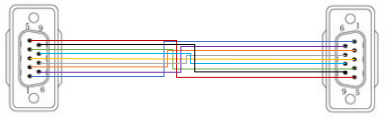
A standard DB9 AT cable pinout (non-null modem)
Originally, all serial cables were AT cables and could not connect two devices (such as two computers) directly. They required a modem or similar equipment as a go-between. Null modem cables changed that old standard, allowing devices to be linked up directly with no middleman equipment. This allows older computers and other machines with serial ports to transfer data between each other directly, similar to more modern ethernet crossover cables.
Null modem cables work by switching around wire pairs when going from one end of the cable to the other. Returning to the DB9 example, a null modem cable would have Pin 2 on one side connected to Pin 3 on the other side. Then Pin 4 would be connected to Pin 6 and Pin 7 to Pin 8. Pins 1 and 9 are unused while Pin 5 still connects to itself, acting as the ground wire.
This type of null modem cable is called a Handshake cable. The way these cables are wired allows two connected devices to talk and listen to each other at the same time. Standard AT cables attempt to do the same thing cannot due to their straight-thru pinout. For example, if Pin 2 is connected to Pin 2, both pins are trying to “talk”. Whereas if Pin 2 is connected to Pin 3, one pin “talks” while the other “listens”.
While there are a few different types of handshake cables, the chart below shows the most common version and is the only type available as a stock item today. When someone says “null modem”, this is the version they are referring to. With serial cables now considered obsolete, the odds of running into one of the other types is practically non-existent unless you happen to be using very old, very specific equipment.
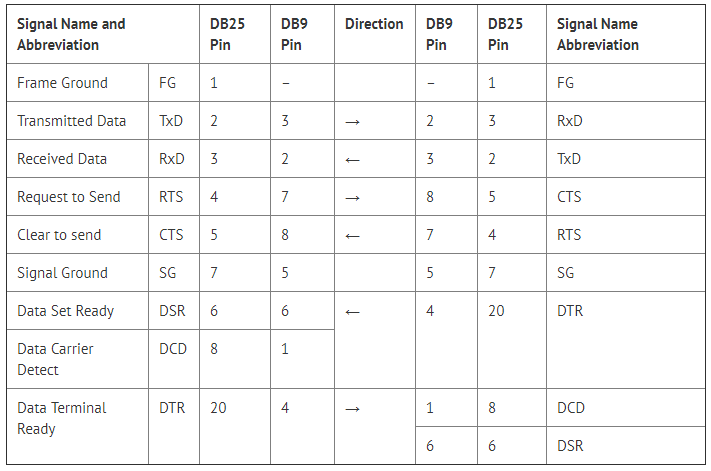
A standard pinout featuring the two most common null modem cables, DB9 and DB25
Null modem cables are still somewhat common today, having been used on many machines for a few decades. Along with full-fledged cables, there are also null modem adapters that can be used to change a straight-thru cable into null modem. When using an adapter, make sure to only put a null modem adapter on one end. The adapters change the pin configuration from straight-thru to null modem. So if null modem adapters are installed on both sides, the pins will line up (like a straight-thru cable) again.
One downside of null modem cables is their limited distance. AT cables can easily cover distances of up to 100-feet while null modem cables have a maximum distance of 25-feet. This 25-foot limit also applies when using a null modem adapter with a serial cable.
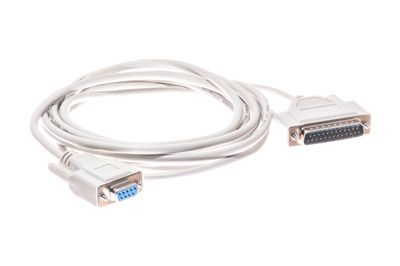
Tips for Choosing a Null Modem Cable
1. Identify the Serial Interface
Confirm that the equipment uses an RS-232 or compatible serial interface before selecting a null modem cable.
2. Check the Connector Type
Determine whether the equipment uses DB9, DB25, or another serial connector.
3. Determine the Required Pinout
Do not assume that every null modem cable uses the same wiring. Check whether the equipment requires a basic three-wire configuration or additional handshake signals.
4. Check Connector Gender
Verify whether the equipment requires male or female connectors on each end.
5. Determine the Required Cable Length
Select a length that allows the devices to connect comfortably without unnecessary slack.
6. Check Flow-Control Requirements
Determine whether the equipment uses hardware flow control such as RTS/CTS or other handshake signals.
7. Check the Equipment Documentation
Manufacturer documentation is the best source for determining the required serial wiring configuration.
8. Avoid Assuming Similar Cables Are Interchangeable
A standard RS-232 cable and a null modem cable may use the same connector type but have different pinouts.
FAQs – Frequently asked questions
What is a null modem cable?
A null modem cable is a serial cable that crosses certain communication signals, especially transmit and receive, to allow compatible devices to communicate directly without an intermediate modem.
What is the purpose of a null modem cable?
Its primary purpose is to connect two compatible serial devices directly by modifying the signal connections between their serial ports.
What is the difference between a null modem cable and a straight-through cable?
A null modem cable typically crosses transmit and receive signals, while a straight-through serial cable generally connects corresponding pins directly.
Is a null modem cable the same as an RS-232 cable?
Not necessarily. RS-232 describes a serial communication standard/interface, while a null modem cable describes a particular wiring configuration used with compatible RS-232 connections.