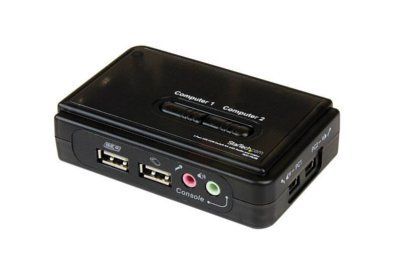
2-Way Manual KVM VGA/USB/3.5mm Audio Switch - Cables Included
The 2-Way Manual KVM Switch allows you to share one set of keyboard, mouse, monitor, and speakers. This will save you money and desk space. Simply connect both computers and a keyboard, mouse, monitor, and speakers to the switch, then the switch will allow you to control either computer.
Features:
USB 2.0 port KVM switch
Connectors Input:
1x DB15HD (VGA) female
2x USB-A female
2x 3.5mm audio female
Output:
2x DB15HD (VGA) female
2x USB-B female
Manual switch via push button
LED display for monitoring status.
Supports Microsoft Intellimouse, Logitech Net Mouse, etc
A: A KVM Switch is a device that allows someone to use more than one computer from only 1 keyboard monitor and mouse. Anyone can manage every computer in their office/server room from their desk without getting up. The limits to what you can do with KVM Switches are few. You can manage anywhere from 2 computers to thousands of servers using a KVM Switch.
Q: Will I have to install any software on my computers?
A: No. KVM Switches are a hardware-only solution to PC management. They are designed to not intrude on PC performance thus are plug and play.
Q: What is Hot Key Switching?
A: Hot key switching allows you to switch between computers without pushing the buttons on the actual switch. It can be a combination of keys or hitting a button a couple of times each switch is different and the instructions are in the manual.
Q: What is a USB KVM Switch and why are they different?
A: A USB KVM Switch is a KVM Switch that uses USB Peripherals instead of the standard PS/2 keyboard and mouse. USB KVM Switches also allow you to share USB Peripherals such as scanners printers etc. among the connected computers. Since they are USB they are 100% plug and play and you don't have to power down the computer to plug in the cables.