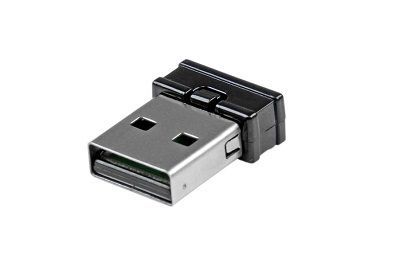
Mini USB Bluetooth 4.0 Adapter - 33ft - Class 2 EDR Wireless Dongle
Add Bluetooth 4.0 capabilities to a laptop or desktop computer through USB
Quantity Discount Pricing
1-3
4-5
6-7
8-9
10+
$35.79
$33.98
$32.39
$30.81
$29.45
Quantity Available: 15
The USB to Class 2 Mini Bluetooth® Dongle lets you add Bluetooth wireless capabilities to a laptop or desktop computer through USB, with support for transfer distances of up to 10m (33ft). Compliant with Bluetooth 4.0 LE +EDR , the USB Bluetooth adapter offers data transfer rates up to 3 Mbps and low power consumption. The adapter is also backward compatible with previous Bluetooth standards (v3.0, 2.0, 1.2 and 1.1) to ensure connectivity with all of your Bluetooth devices.
Features:
Bluetooth version 4.0 support Class 2 Distances of up to 10m (33ft) Backward compatible with previous Bluetooth standards (v3.0, 2.0, 1.2 and 1.1)
Q: What’s the difference between the different USB versions?
USB 1.1 Released in 1998 Specifies max data rates of 12 Mbit/s (Full Speed) Mostly used on devices such as keyboards mice joysticks printers scanners. Still used by some devices that don't need faster data transfer rates. USB 2.0 Released in 2000 Specifies max data rates of 480 Mbit/s (Hi-Speed) Compatible with USB 1.1 but some hardware designed for USB 2.0 may not work with USB 1.1 host controllers. USB 3.0 Released in 2008 Specifies max data rates of 5 Gbit/s (SuperSpeed) A January 2013 press release from the USB group reveals plans to update USB 3.0 to 10 Gbit/s to put it on par with Thunderbolt by mid-2013. Q: What if I need to extend my current USB cable past the 16 foot distance limit?
A: Because passive USB cables have a distance limitation you would need an Active Extension Cable to help boost the signal coming from the source.
Q: I'm unsure what USB adapter or connector I need can you help?
A: Please click on the resource tab to see the USB connector graph. This should help identify the correct cable.
USB Connector Guide
Connector Type
Picture
Common Use
USB 2.0 A Male
Commonly plugged into the USB port on a computer
USB 2.0 A Female
Commonly used for extending the length of an existing USB cable. USB A Male is able to plug into this connector
USB 2.0 B Male
Commonly used on a printer external hard drive and other USB Devices
USB 2.0 Micro Male
Commonly used on new smartphones and other USB devices
USB 2.0 Mini Male
Commonly used on cell phones digital cameras and GPS devices
USB 2.0 Mini Female
Commonly used to extend the length of an existing USB mini cable
USB 3.0 A Male
Commonly used on USB 3.0 devices
USB 3.0 B Male
Commonly used on USB 3.0 printers and other USB devices
USB 3.0 Micro
Commonly used on USB 3.0 hubs and other devices