
Know the RJ45 Color Code for Easy Connections and Repairs


RJ45 Color Codes Explained
An RJ45 connector is a modular, eight-position, eight-pin connector used for terminating Cat5e or Cat6 twisted-pair cable. An RJ45 color code or “pinout” is a specific arrangement of wires that dictate how the connector is terminated. Since the color code specifies the order in which the individual wires within the cable should be connected to the pins on the RJ45 connector, knowing the color code is essential when you need to make or repair Ethernet cables.
There are multiple pinouts for RJ45 connectors, including:
- Straight-through (T568A or T568B)
- Crossover
- Rolled
- T1
- Loopback
Straight-through is the most common type of cable and is used for connecting your computer to your network. The other RJ45 color codes are for specialty cables that are used for unique network applications.
Within the family of straight-through R45 color codes, there are two standards recognized by ANSI, TIA, and EIA:
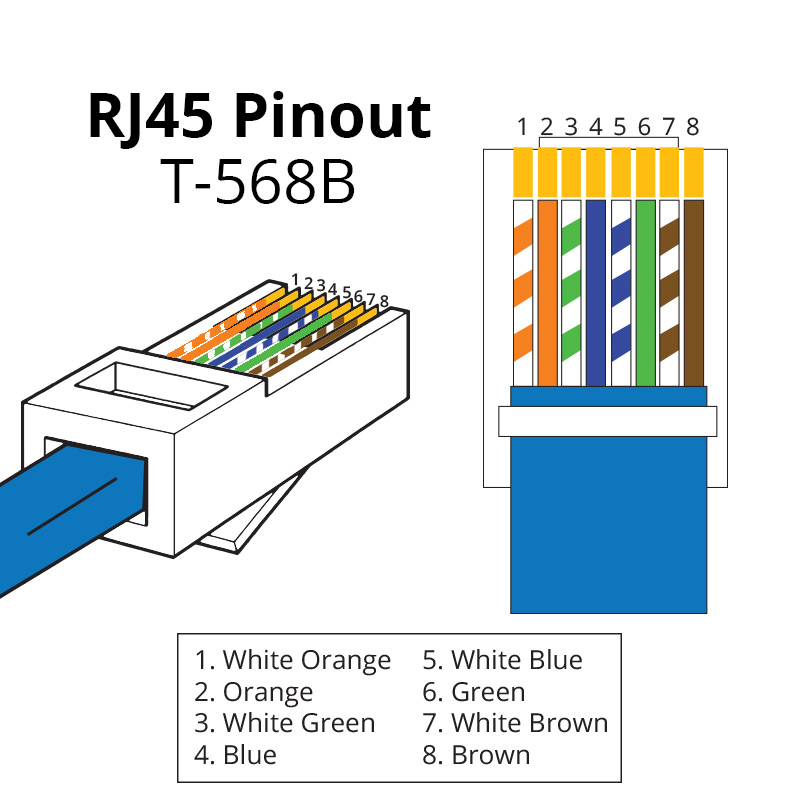
- The T568B wiring standard is seen as the default wiring scheme for twisted-pair structured cabling in the U.S. It uses four pairs of wires, with each pair being a different color.
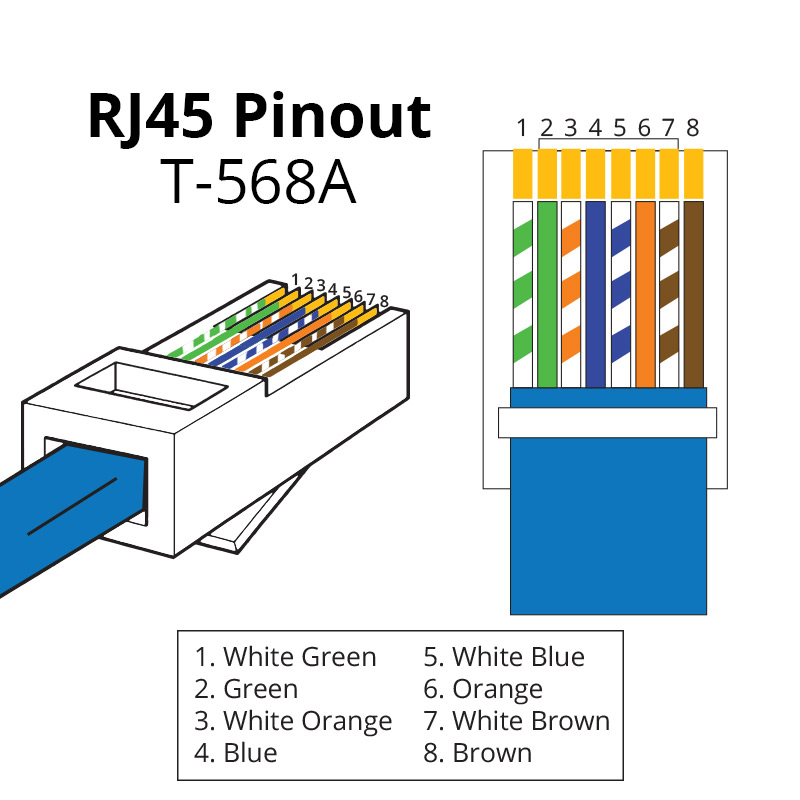
- The T568A wiring standard differs from T568B only in the order of the green and orange pairs. However, it has been surpassed by T568B – if you are unsure of which standard to use, choose T568B.
We recommend using the same wiring scheme on both ends of a cable to ensure proper connectivity.
Key Takeaways
- The RJ45 colour code identifies the arrangement of the eight wires inside an Ethernet cable.
- Ethernet cables contain four twisted pairs, with each pair using a solid-coloured conductor and a corresponding white/striped conductor.
- The two commonly recognised wiring standards are T568A and T568B.
- T568B is widely used for Ethernet patch-cable installations.
- A straight-through cable normally uses the same wiring standard on both ends.
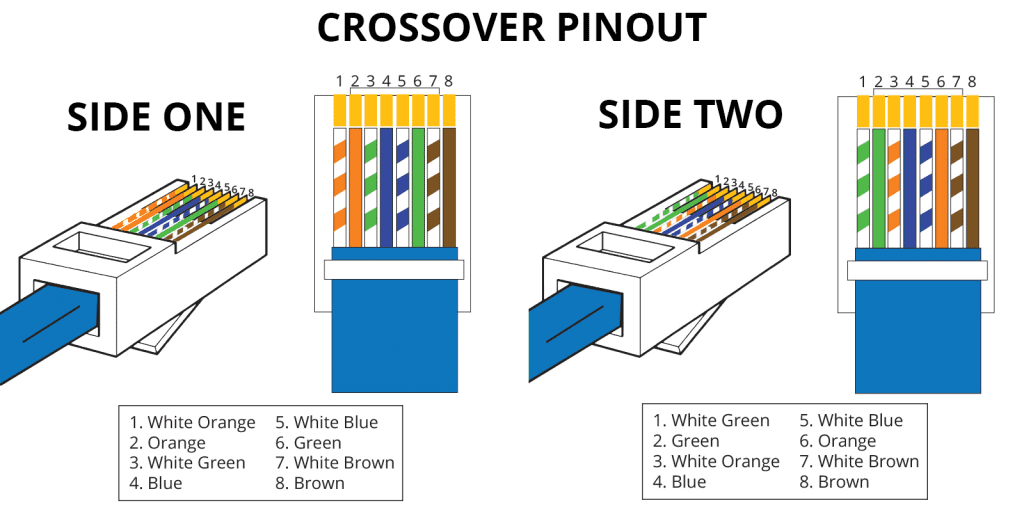
- Using T568A on one end and T568B on the other creates a crossover wiring arrangement.
- Correct wire sequencing is essential when terminating RJ45 connectors.
- Maintaining the twists in each pair close to the termination helps preserve cable performance.
- A cable tester should be used to verify the finished cable and identify wiring errors.
- RJ45 colour coding is particularly important when making custom Ethernet cables or troubleshooting network connectivity.
T-568A RJ45 Color Code
 T-568B RJ45 Color Code
Crossover RJ45 Color Code
A crossover cable utilizes two different RJ45 color codes for the two ends of the cable. If you need to connect 568A equipment to 568B you can use a crossover cable.
RJ45 Colour Code Tips
1. Follow One Wiring Standard
When terminating an Ethernet cable, choose either T568A or T568B and follow the selected standard consistently. For a conventional straight-through cable, the same standard should generally be used at both ends.
2. Check the Wire Sequence Before Crimping
Double-check the conductor order before inserting the wires into the RJ45 plug. A single misplaced conductor can result in an incorrectly terminated cable.
3. Keep the Twisted Pairs Together
Ethernet cables are designed around twisted pairs. Avoid unnecessarily separating or untwisting the conductors because excessive untwisting can affect signal performance.
4. Use the Correct Connector
The RJ45 plug should be compatible with the cable construction and category being used. Solid-conductor and stranded-conductor cables may require different connector types.
5. Test Every Custom Cable
After termination, use an Ethernet cable tester to verify continuity and wire mapping. Testing can identify open wires, shorts, reversed connections, and other termination problems.
FAQs – Frequently asked questions
What is an RJ45 colour code?
An RJ45 colour code is the standardised arrangement used to identify the eight conductors in an Ethernet cable when terminating an RJ45/8P8C connector.
What are the two RJ45 wiring standards?
The two commonly used wiring standards are T568A and T568B.
Which RJ45 colour code should I use?
For a new installation, follow the applicable cabling standard and project requirements. When working on an existing network, matching the wiring standard already in use is generally recommended.
What is the most common RJ45 wiring standard?
T568B is widely used for Ethernet patch cables and network installations.