
Discussing Cat5 Length Limits


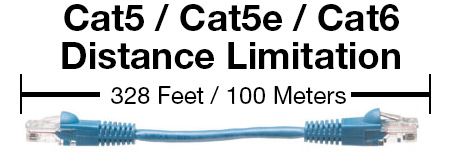
Cat5 cable is a standard term for twisted pair cable commonly used for connecting PCs and hardware to different equipment. It has been replaced by Cat5e, which is an enhanced version of Cat5. These share many of the same physical characteristics including distance limitations, but Cat5e is designed for faster networking speeds and reduced crosstalk interference. The maximum length you can run Cat5, Cat5e, Cat6 and Cat6a cable is 100 meters or 328 feet. If you require a longer run, you will need to put an active component, such as a router, in-between the signals.
Key Takeaways
- Cat5 cable length limits depend on the Ethernet standard, cable category, and complete channel configuration.
- The commonly referenced maximum channel length for conventional twisted-pair Ethernet is 100 metres (328 feet).
- The 100-metre figure includes the overall channel rather than necessarily representing one uninterrupted patch cable.
- Cat5e is commonly used for modern Ethernet installations and has specified electrical performance over 100-metre distances
- Cable length, termination quality, interference, and installation practices can all affect network performance.
- Avoid simply adding passive cable when a run exceeds the supported Ethernet distance.
- For longer connections, consider network switches, Ethernet extenders, or fibre optic cabling.
- Use outdoor, plenum, industrial, or shielded cable when the installation environment requires it.
- Test long Ethernet runs after installation to identify wiring and performance problems.
- When planning a new network, consider both current and future bandwidth requirements.
- Proper route planning and cable management can make long network installations easier to maintain.
The length limit for Cat5 also includes any patch cables, jacks or couplers that are connected in the run. For example, you could not run 100 meters of Cat5 cable between the walls, and then connect with a jack to another 10 meter cable. In terms of distance limitation, the 100 meters of Cat5, the jack and additional 10
meters of Cat5 are all seen as a single length of cable. It is recommended to only run the structured cabling (the horizontal cabling or the infrastructure cabling) 90 meters to give adequate length for end users patching into the network jacks.
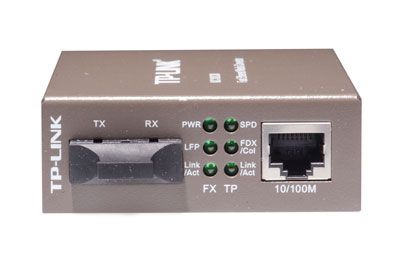
Although Cat5 has been eclipsed by Cat5e and now Cat6 cables, the Cat5e and Cat6 max length distance limitation remains unchanged. If you need to go farther than 100 meters and can’t add an active component, you will need to use fiber optic cable. Depending upon the type of fiber you use, the distance limitation can be up to 10 kilometers. By using a fiber media converter, you can integrate fiber optic cable into your copper (cat5, cat5e, cat6) network.
Tips for Managing Cat5 Cable Length
1. Plan the Cable Route Before Installation
Measure the actual route the cable will follow rather than measuring only the distance between the two devices. Include vertical runs, turns, patch panels, and equipment-rack routing.
ShowMeCables recommends accounting for additional cable required for routing when planning long cable runs.
2. Keep the Permanent Link Within the Appropriate Distance
For conventional twisted-pair Ethernet installations, 100 metres (328 feet) is the commonly referenced maximum channel length, including the permanent link and patch-cord allowances. The exact supported distance depends on the Ethernet standard and cabling implementation.
3. Understand the Difference Between Cat5 and Cat5e
When discussing older Cat5 installations, verify the actual cable category and network standard being used.
Cat5e is widely used for modern Ethernet installations and has documented electrical performance over 100-metre channel distances. ShowMeCables provides Cat5e cable specifications with electrical characteristics specified per 100 metres.
4. Avoid Unnecessary Cable Slack
Excess cable should not simply be bundled into large or tightly compressed loops. Plan the installation so the cable has enough length for routing while avoiding excessive slack.
5. Follow Bend-Radius Requirements
Avoid sharp bends or excessive pulling force. Follow the cable manufacturer's recommended bend radius and installation practices to help preserve cable performance.
FAQs – Frequently asked questions
What is the maximum length of a Cat5 cable?
For conventional Ethernet over balanced twisted-pair copper, the commonly referenced maximum channel length is 100 metres (328 feet). The actual limit depends on the Ethernet standard, cable category, installation, and channel configuration.
Can I run Cat5 cable more than 100 metres?
A copper Ethernet channel should not simply be extended beyond its specified distance by adding more passive cable. For longer runs, consider active networking equipment, Ethernet extenders, or fibre optic cabling.
Does cable length affect Ethernet speed?
Yes. As cable length increases, signal attenuation and other transmission effects can become more significant. Staying within the supported channel distance helps maintain the expected network performance.
Can a 100-metre Ethernet cable provide full speed?
A properly installed cable and compatible equipment can support the applicable Ethernet standard over its specified channel distance. Performance can be affected by cable quality, connectors, installation practices, interference, and the specific Ethernet standard.