
4 Ways You Can Benefit from Right-Angle Power Cords


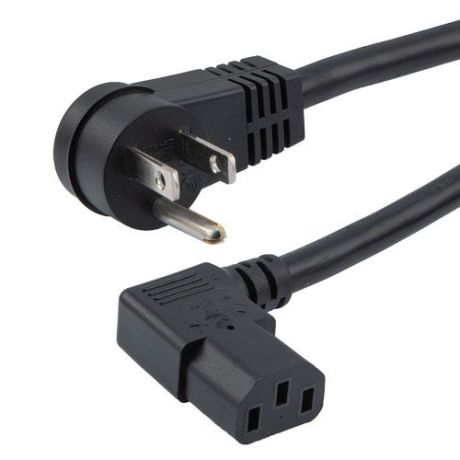
The detachable power cord you get when you buy an electronic device is not always the one you need – sometimes a right-angle power cord would serve you better. Especially when your device is located in a tight space and is sharing an electrical outlet with other components, a right-angle power cord will make your installation more functional.
Key Takeaways
- Right-angle power cords are designed to improve cable routing in space-constrained installations.
- They can reduce the clearance needed behind equipment.
- Angled connectors can help create cleaner and more organised cable routes.
- They can be useful in server racks, data centres, offices, equipment cabinets, and wall-mounted installations.
- The connector angle does not determine the cable's electrical rating.
- Always verify voltage, current, grounding, connector type, and application requirements.
- Connector orientation is important when working with limited space.
- Choose an appropriate cable length to avoid unnecessary loops and cable clutter.
- Proper routing can help reduce mechanical stress around the equipment connection.
- A right-angle power cord should be selected based on both physical fit and electrical compatibility.
Angled AC cords, also referred to as 90-degree power cords whether they angle right or left, can replace the universal power cords you use for computers, monitors, servers, printers, scanners, AV equipment, and more. These CPU/PDU power cables come in four main types:
- Right-angle plugs that direct a power cord 90 degrees left or right from the outlet
- Right-angle connectors that direct a cord 90 degrees left/right from the back of a device or PDU
- Rotating right-angle plugs that direct a cord in any direction from the outlet
- Upward-angle connectors that direct a cord 90 degrees upward from the back of a device
Following are four ways you can benefit from power cords with 90-degree angled plugs and connectors:
4 Benefits of Right-Angle Power Cords:
- More Compact Installations: Straight plugs and connectors protrude from outlets, devices, and PDUs, forcing you to increase space between the two. Angled plugs and connectors minimize protrusion, allowing you to move devices closer to the wall, which takes up less space in a room or IT closet. This is especially true when you wall-mount a device.
- Less Cord Strain: In tight spaces where a straight plug or connector would force there to be a sharp bend in the power cord, a 90-degree plug or connector helps reduce strain on the cord. This prevents cord damage and ensures a more secure connection.
- Directional Cable Routing: When numerous straight plugs and connectors are massed in a small space, they can get tangled and are harder to locate. Angled plugs and connectors direct your power cords away from the mass of wires and any other obstacle. Such managed cable routing makes for quicker cable maintenance and creates a more orderly and professional appearance for your installation.
- Emergency Backup: When you replace a straight computer power cord with an angled one, nothing is wasted. You can keep the straight cable as an emergency backup, which is essential for critical electronic devices in the business world.
Tips for Choosing Right-Angle Power Cords
1. Check the Connector Type
Identify the equipment-side connector and make sure the right-angle power cord uses the correct connector configuration.
2. Determine the Required Direction
Right-angle connectors can be designed to route the cable in different directions. Consider whether the cable needs to exit upward, downward, sideways, or toward the rear.
3. Measure Available Clearance
Measure the space around the equipment before choosing a cable. The purpose of an angled connector is to improve routing, but the connector housing still requires sufficient room.
4. Verify Voltage and Current Ratings
Make sure the power cord is appropriately rated for the equipment and application. Do not select a cable based only on connector compatibility.
5. Choose the Correct Length
Select a length that provides enough reach without creating unnecessary cable loops or slack.
6. Consider Cable Flexibility
For installations requiring frequent movement, choose a cable with suitable flexibility. For fixed installations, consider how the cable will be routed and secured.
ShowMeCables offers 90-degree power cords in 10 lengths, 9 form factors, 4 wire gauges, power draws from 10 amps to 20 amps, and connector types that include NEMA 5-15 and C13 to C20. They are made for general indoor use in your office or home.
ShowMeCables’ right-angle power cords are in stock and available with same-day shipping. In-stock products ordered before 5 p.m. ET ship the same day, and if you have any questions about our right-angle power cords, contact our U.S.-based customer service at +1 (888) 519-9505, email us, or chat.
FAQs – Frequently asked questions
What is a right-angle power cord?
A right-angle power cord is a power cable with an angled connector that allows the cable to exit the equipment at an angle rather than straight out.
What are the benefits of angled power cords?
They can help save space, improve cable routing, reduce cable protrusion, simplify cable management, and provide more flexibility in tight installations.
Are right-angle power cords safer?
The angled design itself does not automatically make a power cord safer. Safety depends on the cable's construction, ratings, grounding, applicable standards, and proper use.